Migrate Your Shopify App for Market-Driven Shipping
A developer migration guide for Shopify's market-driven shipping: detect the shipping model, audit GraphQL reads and writes, move merchant config to the Markets API, and keep app-owned delivery profiles working.

Editorial note
Platform contracts and the market-driven shipping preview were verified first-hand on a Shopify Plus development store with the feature preview enabled on August 3, 2026, at Admin API version 2026-07. This guidance reflects preview behavior, which changes before general rollout, so re-verify field names, scope names, coversAllItems behavior, rollout dates, and the current stable API version against official Shopify documentation at implementation time.
What market-driven shipping changes
Market-driven shipping moves where a merchant's shipping configuration lives. The buyer still sees delivery options at checkout, but the API that owns and expresses those options is changing. If your app reads or writes a merchant's shipping rules, that change reaches your code, and this guide is the migration path.
This guidance was verified first-hand on a Shopify Plus development store with the market-driven shipping feature preview enabled on August 3, 2026, at Admin API version 2026-07. Everything described here is preview behavior. Preview contracts change before general rollout, so treat exact field names, scope names, and dates as things to re-verify against Shopify's documentation at implementation time.
Merchant configuration moves to Markets
Under market-driven shipping, merchant-owned shipping configuration moves from the
DeliveryProfile API to the Markets API. It is exposed through
Market.delivery.shipping, where DeliveryOptionDefinition objects
carry fields such as freeDeliveryMinimumValue, isActive,
includedLocations, and includedCollections. The merchant now manages
shipping per market rather than through a single global delivery-profile structure.
App-owned delivery profiles remain a separate contract
App-owned delivery profiles do not move. They continue to use the existing
DeliveryProfile API. This is the most important boundary in the migration: the
Markets API owns the merchant's configuration, while the
DeliveryProfile API still owns the profiles your app creates and manages.
The two models are separate contracts, not two views of the same data.
On the same preview store, an app-created DeliveryProfile scoped to a single
product variant coexisted with the merchant's market-driven configuration. The general, or
default, profile held the other variants, the app-owned profile held its one variant, and
Market.delivery.shipping.isEnabled remained true throughout. That confirms the
two ownership models run side by side rather than replacing one another.
Why legacy reads can become stale and writes can become no-ops
The risk during rollout is silent divergence. When a shop is on market-driven shipping, its
authoritative shipping configuration is in the Markets API. Code that keeps reading merchant
shipping rules from DeliveryProfile can return an incomplete or stale picture,
because the merchant is no longer editing configuration there. Writes aimed at merchant
configuration through the legacy path can effectively become no-ops for the merchant-owned
surface.
Draw the presentation boundary early
Market-driven shipping changes the underlying shipping model and its ownership. It is not a checkout-presentation feature. Reshaping how options are displayed still belongs to the
Delivery Customization Function
, which owns option presentation and not the shipping model underneath it. Keep those two responsibilities in separate parts of your design.
Does your app need to change?
Not every app is affected. Sort your app into one of three categories before you plan any work, because the category decides how much migration you owe.
App-owned-profile-only apps
If your app only creates and manages its own delivery profiles through the
DeliveryProfile API and never reads or writes the merchant's shipping
configuration, the migration surface is small. The verified coexistence test supports this:
the app-owned profile kept working while market-driven shipping was enabled. You still need to
confirm your profiles behave as expected on a market-driven store, but you are not moving your
configuration to a new API.
Merchant-profile readers
If your app reads the merchant's shipping configuration—rates, thresholds, zones, or
included locations—to display, sync, or reason about it, you are affected. Once a shop is on
market-driven shipping, the authoritative source for that data is the Markets API. A reader
that stays on DeliveryProfile for merchant configuration risks returning a partial
or stale view.
Merchant-profile writers
If your app writes the merchant's shipping configuration—creating or editing rates, thresholds, or zones on the merchant's behalf—you have the largest migration. Writes to merchant-owned configuration move to the Markets API, and that path requires new scopes and, therefore, merchant reauthorization. Plan this category first, because it carries the consent step and the highest chance of a silent no-op if left on the legacy path.
| App category | Interacts with | Migration surface | New scope required? |
|---|---|---|---|
| App-owned-profile-only | Its own DeliveryProfile objects | Confirm behavior on market-driven stores | No new scope beyond existing delivery-profile access |
| Merchant-profile reader | Merchant shipping configuration (read) | Add Markets API or Contextual Product Feeds read path | read_markets or read_product_listings |
| Merchant-profile writer | Merchant shipping configuration (write) | Move writes to the Markets API with consent | read_markets plus write_markets |
An app can fall into more than one category. If it does, treat each category's migration separately so that a low-risk reader change does not get blocked behind a writer's reauthorization work.
Audit your GraphQL operations
Before you write migration code, inventory what your app actually touches. The audit tells you which category applies and how much reauthorization you owe.
Fields and mutations to search for
Search your codebase for every operation that reads or writes shipping configuration. Start
with references to deliveryProfile, deliveryProfiles,
deliveryProfileCreate, deliveryProfileUpdate, and the profile fields
that describe locations, zones, and method definitions. Then search for anywhere your app
already reads Market, so you know your current Markets coverage.
Separate the results into two lists: operations that touch the merchant's configuration and
operations that touch your app's own profiles. Only the first list migrates to the Markets API.
The second list stays on DeliveryProfile. Mixing the two lists is the most common
way a migration accidentally breaks an app's own profiles.
How to determine profile ownership
For each delivery profile your code reads or writes, decide who owns it. A profile your app
created and manages is app-owned and stays on the DeliveryProfile API. A profile
that represents the merchant's own general shipping configuration is the surface that moves to
the Markets API on a market-driven store. When in doubt, trace how the profile was created:
if your app created it, your app still owns it.
Detect the shop's shipping model programmatically rather than guessing. On the preview store, this query distinguished the two worlds reliably:
| Query | Market-driven preview store | Legacy (non-preview) store |
|---|---|---|
Market.delivery.shipping { isEnabled optionDefinitionsCount { count } } | isEnabled true, option definitions present | isEnabled resolved null, config stayed in DeliveryProfile |
Treat Market.delivery.shipping.isEnabled as the reliable programmatic detection
approach: branch on it to decide whether to read merchant configuration from the Markets API or
from DeliveryProfile. As an alternative signal you can inspect
ShopFeatures or feature-preview status, but verify the exact current field name
against Shopify's documentation at implementation time, because field names can change before
general rollout.
Scopes and reauthorization inventory
Finish the audit with a scope plan. Reading merchant configuration through the Markets API
needs read_markets, or read_product_listings if you read through
Contextual Product Feeds. Writing merchant configuration needs read_markets plus
write_markets. App-owned profile writes need no additional scope beyond your
existing delivery-profile access. Any new scope forces merchant reauthorization and consent, so
record which stores need it and stage the request. See
Shopify's access-scope documentation
for the current scope names and consent behavior.
Reader migration paths
Readers have two supported ways to obtain merchant shipping configuration on a market-driven store, plus a branch that keeps legacy stores working during rollout.
Contextual Product Feeds
If your app already consumes Contextual Product Feeds, or primarily needs the buyer-facing,
market-contextual view of options, that path can supply the market-aware data with the
read_product_listings scope. This suits readers that care about what a buyer in a
given market would see rather than the raw merchant configuration objects.
Direct Markets API reads
For readers that need the merchant's configuration structure itself, query it directly through
Market.delivery.shipping. The DeliveryOptionDefinition objects there
carry the fields your reader previously pulled from delivery profiles, such as
freeDeliveryMinimumValue, isActive, includedLocations,
and includedCollections. This path uses the read_markets scope and
gives you the per-market configuration model. Consult the
for the current field set.
Branching on shop shipping model
During rollout you will have both market-driven and legacy stores installed at once, so a
reader cannot commit to one API globally. Branch per shop on
Market.delivery.shipping.isEnabled: when it is true, read merchant configuration
from the Markets API; when it resolves null, read from DeliveryProfile as before.
Keep the branch in one place so the rest of your app receives a normalized view regardless of
which model the shop is on. If you already structure Admin GraphQL calls carefully, the
patterns in the
Shopify Admin GraphQL patterns in Rails
guide apply directly to keeping this branch versioned and testable.
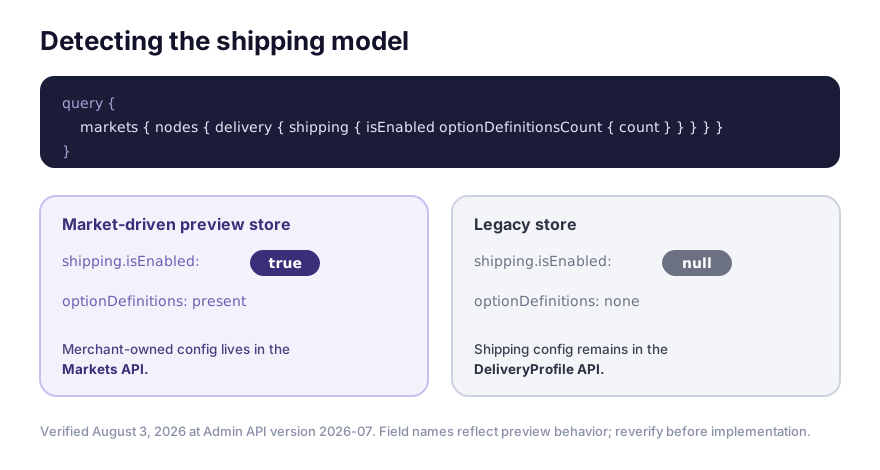
The same query returns isEnabled: true with option definitions on a market-driven-preview
store and null on a legacy store, where configuration stays in the DeliveryProfile API.
Verified August 3, 2026 at Admin API 2026-07; reverify the exact field name before implementation.
Writer migration paths
Writers carry the reauthorization step, so plan them deliberately. Keep app-owned writes and merchant-owned writes on separate paths.
App-owned profiles and coversAllItems
Writes to your app's own delivery profiles stay on the DeliveryProfile API and
need no additional scope. The verified coexistence test showed an app-owned profile scoped to
one variant working alongside market-driven configuration, with the default profile holding the
remaining variants. When you scope an app-owned profile to specific variants, review how the
general profile and coversAllItems interact so your profile covers exactly the
items you intend and no others. Re-verify coversAllItems behavior against the
at implementation time, because preview behavior can shift.
Markets API writes
Writes to the merchant's shipping configuration move to the Markets API on a market-driven
store. Express rules as DeliveryOptionDefinition objects with the appropriate
fields rather than as legacy method definitions. On the test store, for example, a
free-shipping rule was represented as a single option definition carrying
freeDeliveryMinimumValue, where the legacy model expressed the same intent as
separate discrete DeliveryProfile method definitions. Your writer needs to map its
internal representation onto whichever shape the target store expects.
Merchant consent and new scopes
Markets API writes require read_markets plus write_markets, and
adding those scopes forces merchant reauthorization. Sequence this so the merchant grants
consent before your writer attempts a Markets API write, and handle the interim state where a
shop is market-driven but has not yet reauthorized. Until consent lands, a writer should avoid
silently attempting merchant configuration writes on the legacy path, since those can become
no-ops for the merchant-owned surface.
Build a safe transition layer
Rollout spans many months, so your app needs a transition layer rather than a hard cutover. The goal is one internal model that both shipping worlds map into and out of.
Legacy and market-driven adapters
Put an adapter behind a single interface. One adapter reads and writes merchant configuration
through DeliveryProfile for legacy stores; the other reads and writes through the
Markets API for market-driven stores. Select the adapter per shop using
Market.delivery.shipping.isEnabled. The rest of your app should not know which
adapter answered. This keeps the branch in one testable place and lets you retire the legacy
adapter after the platform-wide transition completes.
Rate-parity assertions
Add assertions that an equivalent rule produces an equivalent buyer-facing outcome across both
representations. On the test store, the market-driven free-shipping rule used a single option
definition with freeDeliveryMinimumValue set to $70, so the Standard option was
one price below the threshold and free at or above it—verified by crossing the threshold.
The legacy model expressed the same intent as separate method definitions, and the buyer-facing
outcomes were equivalent for the equivalent rule.
Treat the observed shape as one store's example
The $70 threshold and the single-option-definition shape were observations from one preview test store, not universal Shopify defaults. Write your parity assertions against the rule your app configures, not against these specific numbers, and confirm the option-definition shape for the store you are migrating.
Feature flags, telemetry, and rollback
Gate the market-driven path behind a feature flag so you can enable it per shop, watch it, and turn it off without a deploy. Emit telemetry that records which adapter served each shop, how detection resolved, and whether reauthorization completed. Keep a rollback path back to the legacy adapter for shops that are still legacy, and make sure rollback does not attempt to write merchant configuration on a store that has already moved to market-driven shipping.
Preview test matrix
Test the migration on a store with the feature preview enabled before you touch production. The matrix below covers the cases most likely to expose a broken branch. All of it is preview behavior, so re-verify against current documentation as the preview evolves.
Mixed product and location carts
Build carts that span the default profile and an app-owned profile, and carts that pull from
multiple includedLocations. The coexistence test used exactly this shape: an
app-owned profile held one variant while the default profile held the rest, with market-driven
shipping enabled. Confirm your detection branch and adapters produce the right options for each
slice of the cart.
B2B and regional markets
Because configuration is now per market, exercise more than one market. Test B2B and regional
markets so you confirm your reader and writer resolve the correct
Market.delivery.shipping for the buyer's context rather than assuming a single
global configuration.
App rates plus merchant rates
Verify that app-owned rates and merchant-owned rates present together correctly, since the two ownership models coexist. If your app also configures combined or per-line shipping behavior, the companion
covers those interactions, and the
and
are worth checking if your app splits or defers fulfillment across these rates.
Rollout timeline and compatibility
Rechecked against Shopify's documentation on August 3, 2026: the feature preview and stable APIs were available in July 2026, merchant rollout begins in October 2026, and all shops are expected to transition by July 2027. The current stable API version referenced here is 2026-07.
Re-verify the timeline before you ship
These dates describe a preview and a phased rollout. Re-verify the rollout dates, eligibility, and the current stable API version against the
before publishing or merging, since preview timelines change.
The practical consequence for your app is a long coexistence window. Between October 2026 and July 2027 you will have both legacy and market-driven stores installed simultaneously, so the per-shop detection branch and the transition layer are not optional niceties—they are how your app stays correct while the fleet migrates. Keep the legacy adapter in place until the transition completes, then remove it deliberately rather than assuming a single global cutover date. Shopify's
is the authority for the current migration steps.
Failure modes to monitor after launch
After you enable the market-driven path, watch for the failure modes that come from the two shipping worlds diverging. None of these are performance claims; they are correctness signals to instrument.
Stale merchant reads: code still reading merchant configuration from
DeliveryProfileon a market-driven store, returning an incomplete or outdated view. Alert when detection says market-driven but a read used the legacy path.Silent write no-ops: merchant configuration writes sent on the legacy path to a market-driven store that effectively do nothing to the merchant-owned surface. Confirm writes land by reading back through the Markets API.
Missing reauthorization: a shop that became market-driven but never granted
write_markets, leaving writers unable to persist merchant configuration. Track consent state per shop.Detection drift: a shop whose
isEnabledvalue changed after rollout without your app re-detecting it. Re-run detection rather than caching the model indefinitely.App-owned profile regressions: an app-owned profile that stopped covering the variants you intended. Re-check
coversAllItemsand the default-profile interaction on affected stores.
For each signal, decide who is paged and what the recovery step is—re-detect, request consent, or fall back to the legacy adapter for a still-legacy shop—before launch rather than during an incident.
Sources and update triggers
This guide uses Shopify's official documentation as the authority for platform contracts. The first-hand observations—the detection query behavior, the verified coexistence of an app-owned profile with market-driven configuration, and the option-definition shape—were tested on a Shopify Plus development store with the market-driven shipping feature preview enabled on August 3, 2026, at Admin API version 2026-07. They reflect preview behavior, which can change before general rollout.
Upgrade your app for market-driven shipping, the feature-preview documentation, the Markets API reference, the DeliveryProfile reference, and the access-scope documentation were checked on August 3, 2026.
Review this guide when Shopify changes the market-driven rollout dates or eligibility, the exact
detection field name, the Market.delivery.shipping or
DeliveryOptionDefinition field set, the read_markets,
write_markets, or read_product_listings scope behavior,
coversAllItems semantics, or the current stable Admin API version. Before you
publish or merge, re-verify the rollout dates, exact field and scope names, and the stable API
version, and re-label any behavior that is still in preview.
Frequently asked questions
Does every Shopify app need to change for market-driven shipping?
No. Apps that only create and manage their own delivery profiles can continue to use the DeliveryProfile API. Apps that read or write the merchant's shipping configuration are the ones that need to migrate, because that configuration moves to the Markets API when market-driven shipping applies to a shop.
How do I detect whether a shop uses market-driven shipping?
On the preview store, querying Market.delivery.shipping { isEnabled optionDefinitionsCount { count } } returned isEnabled true with option definitions present where market-driven shipping applied, while on a legacy store Market.delivery.shipping.isEnabled resolved null and configuration stayed in DeliveryProfile. Treat this as the reliable programmatic signal, and verify the exact current field name against Shopify docs at implementation time.
Do app-owned delivery profiles still work under market-driven shipping?
Yes. In a verified test on the preview store, an app-created delivery profile scoped to a single product variant coexisted with the merchant's market-driven configuration, and Market.delivery.shipping.isEnabled stayed true. App-owned profiles remain a separate contract from merchant-owned configuration.
What access scopes does market-driven shipping require?
Reading merchant configuration through the Markets API uses read_markets, or read_product_listings through Contextual Product Feeds. Writing merchant configuration uses read_markets plus write_markets. App-owned profile writes need no additional scope beyond your existing delivery-profile access. Any new scope forces merchant reauthorization, so plan the consent step.
Is the buyer-facing shipping math changing?
For an equivalent rule, the migration changes where and how configuration is represented and owned, not the buyer-facing math. On the test store a free-shipping rule was expressed as a single option definition with freeDeliveryMinimumValue, versus separate legacy method definitions, but the buyer outcome was equivalent for the equivalent rule. That value was the test store's setting, not a Shopify default.
When does market-driven shipping roll out?
Rechecked against Shopify docs on August 3, 2026: the feature preview and stable APIs were available in July 2026, merchant rollout begins October 2026, and all shops are expected to transition by July 2027. Re-verify these dates against official documentation before you publish or merge, because preview timelines change.
Recommended reading
Keep exploring the playbook

Shopify Delivery Customization Function deep dive: hide, rename, sort, and safely control shipping options at checkout
A technical Shopify developer guide to Delivery Customization Functions covering hide, rename, and move operations, delivery groups, subscription edge cases, merchant configuration, and the checkout pitfalls that appear in production.

Shopify Admin GraphQL patterns in Rails
Production patterns for using the Shopify Admin GraphQL API from Rails, including service boundaries, pagination strategy, throttling, partial failure handling, and when to switch to bulk operations.

How to run preorders on Shopify without creating support chaos
A merchant guide to preorder messaging, promise-setting, app selection, order handling, and customer communication for stores selling future inventory on Shopify.
Need an owned Shopify app workflow?
We design and build custom Shopify apps with reliable backends, webhooks, and operational escape hatches.
Discuss an app project