How to run preorders on Shopify without creating support chaos
A merchant guide to preorder messaging, promise-setting, app selection, order handling, and customer communication for stores selling future inventory on Shopify.

What merchants need to decide before launching preorders
Preorders work when the commercial promise is clearer than the inventory reality. They break down when the store treats them like a small merchandising tweak instead of a distinct order type with its own payment, fulfillment, and communication rules. Shopify’s own setup guidance is a useful reminder that preorders are not just a button label. Merchants need a reasonable basis for the shipment promise, and if no date is clearly stated, Shopify says you must have a reasonable belief that the product will ship within 30 days of purchase. If you cannot ship within the promised time, you need to provide a revised shipment date and explain the customer’s right to cancel or obtain a refund.
- When payment is captured and how clearly that is disclosed.
- How mixed carts are handled if in-stock and preorder items are purchased together.
- Which delays trigger proactive communication or cancellation options.
- Which payment methods and checkout surfaces are unavailable for preorder orders.
- Whether the app supports the exact checkout and inventory behavior you want.
Start with the promise, not the plugin
The right setup begins with the customer promise you can keep consistently, then works backward into payment logic, checkout constraints, messaging, and app selection.
Where the support load really comes from
Customers usually tolerate waiting when the store tells the truth early, plainly, and in the same words everywhere. Support volume rises when one surface says “ships in June”, another says “delivery in 2 to 3 business days”, the cart does not explain mixed-cart handling, and the order email reads like a normal in-stock purchase. Baymard’s research is useful here because it captures the customer mindset in simple terms: “When will I receive my order?” That question matters even more for preorders, where uncertainty is built into the offer. Baymard also found that users hesitate when stores provide shipping speed without a clear delivery date, because the shopper has to do the mental math alone. Most preorder support volume comes from the same three places: the store was vague about timing, the store was slow to communicate a change, or the customer could not find their own order status. Fix those three and the ticket volume drops fast. In other words, preorder support chaos is usually a communication systems problem. The tickets are symptoms. The root cause is often one of these:
- The estimated ship window is vague or inconsistent across pages.
- The cart does not explain whether in-stock items will wait for the preorder item.
- The payment model was not obvious at checkout.
- The store changes the date but does not proactively notify affected customers.
- The help-center article and support macros do not match the storefront copy.
Consistency beats clever wording
The goal is not to sound polished in one place. The goal is to make the rule feel identical on the product page, in checkout, in the help center, and in post-purchase communication.
Choose the payment model before you choose the app
Many merchants compare preorder apps too early. The first decision is not which app looks best. It is which payment model your business can operate cleanly.
| Model | Best when | Main upside | Main risk |
|---|---|---|---|
| Charge now | Demand is proven and the date window is credible | Strongest cash flow and simplest collections | Highest expectation pressure if dates slip |
| Deposit now | You want buyer commitment with less checkout friction | Balances conversion and commitment | Needs very clear explanation of later payment timing |
| Charge later / due on fulfillment | Inventory timing is uncertain and flexibility matters | Lowest upfront pressure on the buyer | More payment collection and edge-case handling later |
Shopify’s native preorder rules make this operationally important. During checkout, preorder apps can show the deposit due now and the remaining amount due later. Shopify also notes that when customers buy multiple preorder items together, the earliest due date can apply across products, due-on-fulfillment can take priority, and deposits are combined at checkout. That means a merchant cannot afford fuzzy internal rules. Your support team should be able to answer these questions instantly:
- Do we charge the full amount, a deposit, or nothing until fulfillment?
- What happens if two preorder items have different due dates?
- What happens if the release slips?
- What is our cancellation and refund rule before shipment?
Separate inventory payment and fulfillment state
Shopify models preorder timing across several policies and order objects. Treating all of them
as one preorder_status is how teams accidentally reserve the wrong stock, charge at
the wrong moment, or release an order before another system is ready.
| Layer | What it controls | What it does not prove |
|---|---|---|
| Selling-plan inventory policy | ON_SALE reserves inventory at order creation; ON_FULFILLMENT reserves it when fulfilled | ON_FULFILLMENT is not a payment trigger and does not itself create an app-owned fulfillment hold |
| Billing and payment term | Records the checkout charge, remaining balance, and when payment is due | Payment due on fulfillment is separate from the inventory reservation policy |
| Delivery policy | Describes whether fulfillment is ASAP, at an exact time, or unknown | It does not define warehouse routing or a mixed-cart split policy by itself |
| Fulfillment-order hold | Prevents work from proceeding until the owning hold is released | A product badge, order tag, or checkout delivery label is not equivalent to a hold |
| Delivery Customization Function | Renames, sorts, or hides delivery options presented at checkout | It does not calculate combined-order economics, place holds, or route post-checkout fulfillment |
A synthetic audit trace for a mixed in-stock and preorder order should therefore record the selling-plan policies at checkout, the payment term Shopify creates, every resulting fulfillment order, any app-owned hold ID and handle, the customer's ship-together or split decision, balance-collection attempts, and the exact hold IDs released. On failure, leave the affected fulfillment order in review and give an operator a documented retry or manual-release path. This trace is a review model; no connected merchant order or screenshot was available for this update.
Do not confuse ON_FULFILLMENT with due on fulfillment
In Shopify's preorder model, ON_FULFILLMENT names when inventory is reserved.
A due-on-fulfillment payment term controls when payment is due. Stores using either behavior
still need explicit mixed-cart communication, payment-failure handling, and fulfillment
recovery.
If the checkout problem is only how a shipping choice is named or ordered, see the
Delivery Customization Function deep dive
. If the problem is protecting, releasing, or consolidating paid orders, that belongs in the fulfillment workflow instead.
When a preorder rule spans checkout-time decisions, post-order triggers, durable state, and operator recovery, use the
Shopify fulfillment automation guide
to decide whether Flow, a Function, webhooks, or an app backend should own each step.
Design mixed-cart rules before launch day
Mixed carts are where preorder setups most often stop feeling simple. A customer adds one future-release product and one in-stock product, then assumes the operational rule is obvious. It rarely is. You need to choose and communicate one of three approaches:
- Ship everything together when the preorder item is ready.
- Split ship, with separate fulfillment and potentially separate charges.
- Disallow certain mixed-cart combinations entirely.
On Shopify, there are extra constraints to remember. Preorders are not supported through Shop Pay, Apple Pay, or Google Pay. They also do not work with local payment methods such as Klarna, iDEAL, or Sofort. Preorders are only supported on the Online Store and Custom Storefront sales channels. If you rely heavily on accelerated checkout buttons or local payment methods, your preorder UX needs closer QA than a normal product launch. This is also why “just add a badge” is weak preorder strategy. The cart has to explain the fulfillment rule in plain language. If in-stock items will wait, say so. If the order may be split, say so. If a later payment will be collected, say so.
Treat mixed carts as a first-class scenario
If the store sells both in-stock and future inventory, mixed-cart behavior should be visible on the PDP, reinforced in cart, and confirmed again in checkout or order confirmation.
The preorder content stack
The strongest preorder setups repeat the same rule set across every major customer touchpoint. That is what keeps the support queue small when demand spikes.
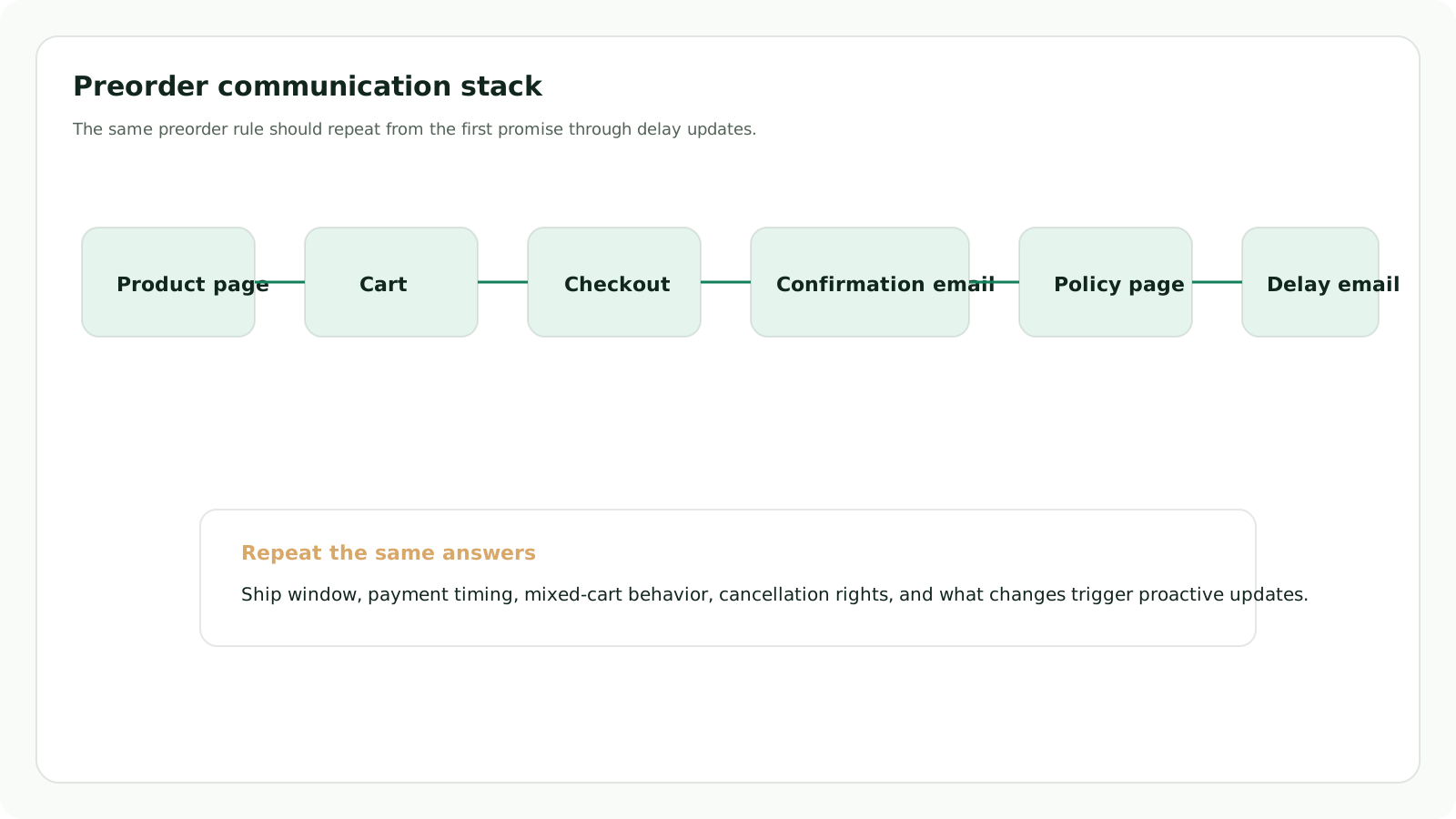
Preorder support load usually falls when the same rule set appears from the PDP through delay updates.
1. Product page
This is where the main promise lives. State the release window, whether payment is charged now or later, and what happens if the customer combines the item with in-stock products. Avoid soft language like “coming soon” when a harder promise is needed.2. Cart
Repeat the fulfillment rule in functional language. The cart is where customers start asking operational questions, especially about combined orders and expected timing.3. Checkout
Shopify already requires the customer to acknowledge that they are buying a product with a purchase option. Use that moment to reinforce what matters most: payment due now, payment due later, and the expected shipment window.4. Order confirmation email
Make the email read like a preorder, not like a normal in-stock order. Shopify allows you to customize email templates individually, which makes this one of the easiest places to reduce confusion after purchase.5. Help center and policy page
Your FAQ should cover payment timing, release-window changes, cancellation rights, mixed carts, and address changes before shipment. This is also where you explain the edge cases support gets repeatedly.6. Delay update email
If timing changes, contact affected customers before they ask. Shopify’s preorder guidance is clear that if you cannot ship within the promised time, you should provide a revised shipment date and explain the right to cancel or obtain a refund.One subtle but important Shopify detail: automated delivery dates are not displayed for preorders created by a preorder app. If you normally rely on automated delivery dates for clarity elsewhere in the storefront, preorders need their own explicit copy system.
Sponsored: When the issue is shipment timing, not preorder logic
Addora is not a replacement for a preorder app. It is useful when preorder-heavy or drop-driven customers keep placing paid orders over time and want to combine shipment later. The Ship Later workflow lets shoppers buy now, hold orders, and choose which pending orders should ship together when they are ready.
.
How to choose a Shopify preorder app
Use app comparison pages as a shortlist generator, not as a decision engine. The right preorder app is the one that matches your operating model with the least amount of manual cleanup.
- Does it support charge now, deposit, and due-on-fulfillment models cleanly?
- Can it explain mixed-cart behavior on the surfaces that matter?
- Does it let you schedule launches and adjust messaging by product or variant?
- Can it help with delay updates, badges, cart notes, or order tagging?
- Does it fit your theme without turning the storefront into a QA project?
- Does it keep enough data or backups for safe migration later?
That last point matters more than many merchants realize. Shopify states that if you uninstall a preorder app, preorder data created in the app, excluding stored customer payment information, is deleted after 48 hours unless the app has its own backup mechanism. That makes migration safety a real product criterion, not a niche technical concern. Related: best Shopify preorder apps, preorder delay email template.
Launch checklist for a low-chaos preorder setup
- Write the customer promise before configuring the app.
- Choose one payment model per preorder program and document the exceptions.
- Define mixed-cart behavior and put it in PDP, cart, and FAQ copy.
- Test accelerated checkout buttons and local payment methods on preorder products.
- Customize order confirmation templates so preorder orders read differently from in-stock orders.
- Prepare support macros for date questions, combined orders, address changes, and cancellations.
- Draft a delay-update email before you need it.
- Tag preorder orders so support and ops can filter them quickly.
- Run end-to-end QA on desktop and mobile for product, cart, checkout, and confirmation email.
- Stress-test the top three customer misunderstandings with someone outside the team.
Do a confusion test, not just a bug test
Ask someone unfamiliar with the launch to answer three questions from the storefront alone: when am I charged, when will it ship, and what happens if I add an in-stock item too?
What to measure after launch
A preorder program should be judged by both revenue capture and support drag. Revenue without operational clarity is not a clean win.
- Preorder conversion rate by product or drop.
- Support tickets per 100 preorder orders.
- Top ticket reasons, especially date confusion and mixed-cart questions.
- Cancellation rate before shipment.
- Delay-notification open rate and follow-up ticket rate.
- Refund rate after delay notices.
- Share of customers choosing preorder when both normal and preorder options exist.
If support contacts cluster around one question, that is usually a content failure before it is a staffing problem. Fix the surface where the misunderstanding begins.
Sources and methodology
This guide draws on Shopify Help Center documentation, Shopify checkout customization guidance, and Baymard UX research relevant to delivery clarity and post-purchase expectations. Platform behavior was rechecked on August 1, 2026. The lifecycle example is synthetic and is not presented as a merchant case study or a live dev-store test.
- Shopify Help Center: Pre-orders
- Shopify Help Center: Setting up pre-orders
- Shopify Help Center: Managing pre-orders
- Shopify Dev: Preorder inventory, delivery, and billing policies
- Shopify Admin GraphQL: fulfillmentOrderHold
- Shopify Help Center: Customizing and editing checkout and accounts pages
- Shopify Help Center: Automated delivery dates
- Shopify Help Center: Shop Promise
- Shopify Help Center: Customizing email notification templates
- Baymard: Use “Delivery Date” Not “Shipping Speed”
- Baymard: Integrate order tracking info and events within the ecommerce site itself
Related: best Shopify preorder apps, support burden estimator, preorder delay email template.
Frequently asked questions
What causes most Shopify preorder support tickets?
Most tickets come from inconsistent promise-setting, not from the existence of preorders. When the product page, cart, checkout, help center, and order emails describe timing or mixed-cart rules differently, customers ask support to resolve the contradiction.
Should preorder stores charge now, take a deposit, or charge later?
That depends on how credible the shipment window is and how much operational flexibility the business needs. Charge now is the clearest financially but carries the most expectation pressure. Deposits and due-on-fulfillment models can reduce friction or risk, but only if the later payment and cancellation rules are explained cleanly.
How should merchants handle mixed carts with preorder and in-stock items?
Choose one rule and repeat it everywhere. Either ship together, split ship, or block certain combinations entirely. The important part is that the PDP, cart, checkout, and post-purchase messages all describe the same operational reality.
Recommended reading
Keep exploring the playbook

Shopify Flow vs Functions vs Webhooks vs Apps for Fulfillment Automation
Choose between Shopify Flow, Functions, webhooks, and app backends for fulfillment automation using timing, ownership, recovery, and plan tradeoffs.

Buy Now, Ship Later on Shopify
A practical guide to Buy Now, Ship Later workflows on Shopify, including when shipment consolidation helps, where it creates support risk, and how Addora fits.

Shopify Delivery Customization Function deep dive: hide, rename, sort, and safely control shipping options at checkout
A technical Shopify developer guide to Delivery Customization Functions covering hide, rename, and move operations, delivery groups, subscription edge cases, merchant configuration, and the checkout pitfalls that appear in production.
Need a durable fulfillment workflow?
We build preorder, hold, release, routing, and operations automation around the order states you actually run.
Discuss fulfillment automation