Why Shopify Combines Shipping Rates, and What Market-Driven Shipping Changes
Diagnose why Shopify combines shipping rates in one cart, split fulfillment across locations, and merging paid orders, and see what market-driven shipping actually changes.

Editorial note
Rate behavior in this guide was reproduced first-hand on August 3, 2026 across paired Shopify Plus development stores, one legacy and one with the market-driven shipping feature preview, using Admin API 2026-07 and draftOrderCalculate to a US domestic address. Preview behavior is labeled as preview and can change before general rollout. The $70 threshold and the $8, $15, and $0 rates shown are the test stores' configuration, not Shopify defaults. Reverify the current combined-rate formula, plan requirements, rollout eligibility, and Help Center guidance before acting.
The three problems merchants call "combined shipping"
When a merchant says Shopify is “combining shipping,” they almost always mean one of three different things. The support thread stalls because everyone is describing a separate problem with the same phrase. Naming the three cases first is the fastest way to reach the right fix.
Rates combined inside one cart
The buyer adds several items to one cart and sees a single set of shipping options. That is checkout rate math: Shopify evaluates the options that apply to the items in that one cart and resolves the buyer-facing rates. It is one calculation over one order. This is the case most settings and app questions are really about.
Split fulfillment from multiple locations
The same cart is fulfilled from more than one location because no single location holds all the stock. That is a fulfillment outcome, not a rate outcome. We tested a cart that exceeded one location's inventory and watched it draw stock from two locations, while the buyer still saw rates resolved for the cart. Split fulfillment and split charges are not the same event.
Combining separate paid orders later
Two orders already completed checkout, and the merchant wants to ship them in one box and adjust the shipping. Checkout rate logic never does this. Merging already-paid orders is an operations and app job that happens after the rate calculation is over, and it belongs to a workflow, not a settings toggle.
Say which problem you have
Rate math in one cart, split fulfillment across locations, and merging separate paid orders are three different jobs. Only the first is a checkout-rate question. The third is an operations job that no rate setting performs.
How legacy shipping profiles calculate rates
On a legacy store, shipping configuration lives in delivery profiles. Understanding that shape explains why rates look the way they do in one cart.
Product and profile contributions
Each product belongs to a shipping profile, and each profile carries its own zones and method definitions. When a cart mixes products from different profiles, Shopify combines their contributions into the buyer-facing options for that single cart. The combination happens at checkout; the products keep their profile membership.
Location groups and matching names
Inside a profile, methods are organized by location groups and shipping zones, each with discrete method definitions. A domestic zone can hold several methods at once. On our legacy test store the domestic zone carried a Standard rate of $8, a conditional free-over-threshold rate of $0, and an Express rate of $15. When methods across profiles share a matching name, Shopify can present them as one combined option to the buyer rather than as separate line items.
Why free and paid rates can surprise merchants
Free-over-threshold is not a switch on the paid rate. It is a separate conditional rate line, for example a Standard $0 rate conditioned on the order total reaching a threshold. So a cart can show a paid Standard rate below the threshold and a free Standard rate at or above it, because two distinct rate lines exist and only one qualifies at a time. Merchants often read this as Shopify “combining” rates when it is simply which conditional line qualified for that cart total. The exact combination formula is Shopify's to define, so read the
combined shipping rates Help Center page
and reverify the current formula before you change live rates.
What market-driven shipping changes
Market-driven shipping is a feature preview that relocates merchant-owned shipping configuration. We reproduced its behavior on a preview development store; treat everything here as preview behavior that can change before general rollout.
Shipping options inside Markets
Instead of living in delivery profiles, merchant-owned shipping configuration moves onto the Markets API, under a market's shipping options. A shipping option becomes a single option definition rather than a set of discrete profile rate lines. That single definition can carry a free-delivery minimum-value threshold directly as a property, rather than expressing the free rate as a separate conditional line.
Product and location conditions
Options in the market model still respond to what is in the cart and where it ships. The difference is where the rule is authored and owned: a market's shipping options, with the threshold attached to the option definition itself. This is the surface the developer companion guide covers in depth. If you are migrating app or store configuration, read the
market-driven shipping app migration guide.
How matching choices are combined
Here is the honest finding from our paired-store test. For an equivalent free-over-threshold rule, the two models produced the same buyer-facing rates. On the preview store the Standard option was $8 below the store's $70 threshold and $0 at or above it; Express stayed $15. On the legacy store the equivalent rule produced the same outcome. Below threshold, buyers saw Standard $8 plus Express $15; at or above threshold, Standard $0 plus Express $15. Market-driven shipping changed how the rule is represented and owned, one option definition with a threshold property versus multiple discrete profile rate lines, not the checkout math for an equivalent rule. It does not, by itself, “fix stacking.”
Preview, and test-store values
The $70 threshold and the $8, $15, and $0 rates are the test stores' configuration, not Shopify defaults. The market-driven results are from a preview store and are labeled as preview. Do not generalize them to every shop.
Worked cart examples
These are reproducible examples from controlled Shopify Plus development stores, run on August 3,
2026 with Admin API 2026-07 using draftOrderCalculate to a US domestic address. The
$70 threshold and the $8, $15, and $0 rates are the test stores' configuration.
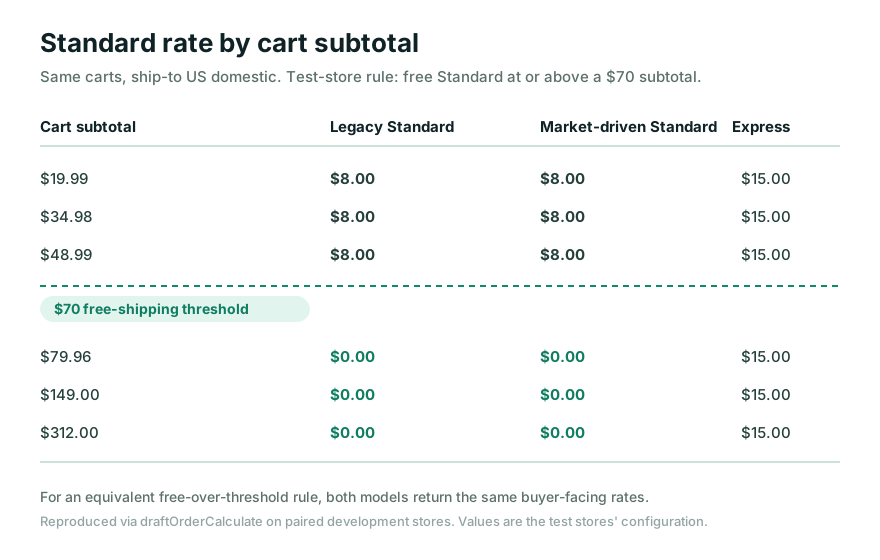
Standard shipping rate returned for the same carts on a legacy store and a market-driven-preview store (US domestic). Below the store's $70 threshold the Standard rate was $8 in both models; at or above it, $0 in both. Express stayed $15. Equivalent rule, equivalent buyer-facing rates.
Free-shipping item plus normal item
We built carts of $19.99, $34.98, and $48.99. All three sat below the $70 threshold and returned Standard $8 and Express $15. Then carts of $79.96, $149, and $312 all sat at or above threshold and returned Standard $0 and Express $15. The presence of a “free shipping” item did not create a second charge; the cart total decided which Standard rate line qualified.
| Cart total (test config) | Relation to $70 threshold | Standard | Express |
|---|---|---|---|
| $19.99 / $34.98 / $48.99 | Below | $8 | $15 |
| $79.96 / $149 / $312 | At or above | $0 | $15 |
Preorder plus in-stock item
A cart mixing a preorder line and an in-stock line still returned the standard domestic rates on both stores. There was no automatic special handling of the preorder line at the rate layer. Separating or holding preorder shipping is a fulfillment-workflow concern. See the
for the merchant policy and the
for a customer-controlled hold-and-release model.
Oversize item plus standard parcel
An oversize item combined with a standard parcel in one cart still resolved to the cart's matching options rather than adding a separate visible shipping charge per item. If you need an oversize item to carry a surcharge or a distinct method, that comes from how its profile or market option is defined, not from the combination step. Confirm the item's profile or option before assuming the cart “stacked” anything.
Inventory split across two locations
A cart that exceeded one location's stock drew inventory from two locations. That is split fulfillment. The buyer still saw rates resolved for the cart. Splitting the fulfillment did not split the shipping charge into two buyer-facing fees. Keep these two effects separate when you diagnose a report of “double shipping.”
What market-driven shipping does not solve
Market-driven shipping relocates and reshapes merchant-owned configuration. It is not a fix for every problem filed under “combined shipping.”
It does not change equivalent checkout math. For an equivalent free-over-threshold rule, our two stores produced the same buyer-facing rates. Moving the rule into a market did not, by itself, alter what the buyer paid.
It does not merge separate paid orders. Combining orders that already completed checkout stays an operations and app job. No rate model performs it.
It does not split the charge when fulfillment splits. Multi-location fulfillment and the buyer-facing shipping charge are resolved separately.
It does not add preorder handling at the rate layer. A preorder line did not trigger special rate behavior on either store.
Treat market-driven shipping as a change to ownership and representation, then decide separately which of the three problems you actually have.
Decision tree: settings, carrier or app rate, Function, or custom workflow
Once you know which problem you have, choose the layer that owns it. Reverify plan requirements and rollout eligibility for your store before committing.
| What you actually need | Where it belongs | Note |
|---|---|---|
| A different rate, zone, or free threshold in one cart | Shipping settings (delivery profiles, or a market's shipping options) | Express the rule where it is owned; verify the current combined-rate formula |
| Live carrier-calculated or third-party rates | A carrier service or a rate app | Confirm plan eligibility for carrier-calculated shipping |
| Hide, rename, or reorder options Shopify already produced | A Delivery Customization Function | Presentation only, not the underlying rate |
| Merge separate paid orders, hold, or consolidate shipments | An app or operations workflow after checkout | No rate setting does this; see the final section |
The Function row is a common trap. A
Delivery Customization Function
owns the presentation of delivery options, hiding, renaming, and reordering what Shopify already computed. It does not change the underlying rate a profile or market defines. If the number is wrong, fix the settings; if the option should be hidden or renamed, use the Function. Confirm the current
Delivery Customization Function API
before building.
How to test before changing live rates
Reproduce the behavior on a development store before you touch a live storefront. The method we used is straightforward to repeat.
Use a development store that mirrors the profile or market configuration you want to change, and record which model it uses.
Calculate rates programmatically with
draftOrderCalculateto a fixed destination address, so each run is comparable. We used a US domestic address on Admin API 2026-07.Sweep cart totals across the threshold. Build carts that sit clearly below and clearly at or above the free-shipping threshold, and record the returned Standard and Express rates for each.
Test the mixed carts that worry you. Preorder plus in-stock, oversize plus standard, and a quantity that forces multi-location fulfillment. Confirm what changes and what does not.
Compare models side by side if you are evaluating the preview. Author an equivalent rule in both and check whether the buyer-facing rates differ. For an equivalent free-over-threshold rule, the tested carts returned the same buyer-facing rates in both models.
Because the market-driven behavior we observed is from a preview store, re-run the comparison for your own store and reverify rollout eligibility and Help Center guidance before changing live rates.
When hold-and-combine is the actual requirement
If your real problem is the third one, merging separate orders a customer already paid for, no rate setting, Function, or market model will do it. That is a hold-and-combine workflow that lives after checkout, in an app and an operations process.
A hold-and-combine workflow owns durable state that the rate layer never sees: which paid orders belong together, when to hold each shipment, how to consolidate them into one dispatch, and how to reconcile any shipping difference outside the checkout calculation. This is the model the
covers, and where Addora fits: it holds and combines paid orders as an operations capability, separate from the checkout rate math this guide is about. If your question is whether consolidation is worth it, the
bundling and consolidation savings calculator
can frame the tradeoff before you build a workflow.
Keep the boundary clean. Checkout resolves rates for one cart. Hold-and-combine reconciles separate paid orders afterward. Solving one with the other is the mistake that keeps these support threads open.
Sources and update triggers
This guide uses Shopify's official documentation as the authority for platform behavior, and
reports first-hand rate results from paired Shopify Plus development stores, one legacy and one
with the market-driven shipping feature preview, tested on August 3, 2026 with Admin API 2026-07
using draftOrderCalculate to a US domestic address. Preview results are labeled as
preview and can change before general rollout. The $70 threshold and the $8, $15, and $0 rates
are the test stores' configuration, not Shopify defaults. Reverify the current combined-rate
formula, plan requirements, and rollout eligibility against Shopify's documentation before acting.
Shopify Help: Combined shipping rates, Shopify Dev: Market-driven shipping feature preview, Shopify Dev: Upgrade your app for market-driven shipping, and the Delivery Customization Function API were checked on August 3, 2026.
Review this article when Shopify changes the combined-rate formula, the delivery-profile model, the market-driven shipping preview scope or rollout status, plan requirements for shipping features, the Delivery Customization Function API, or a quarterly stable Admin API version used by the examples. Before acting on any recommendation here, reverify the current combined-rate formula, plan requirements, rollout eligibility, and Help Center guidance for the target store.
Frequently asked questions
Why does Shopify combine shipping rates into one charge?
At checkout Shopify evaluates the shipping options that apply to the items in a single cart and presents the buyer with combined rates for that cart. It is one calculation over one order, not a merge of separate orders. If items map to different shipping profiles or locations, the platform still resolves a single set of buyer-facing options for that checkout.
Does market-driven shipping stop rates from stacking?
Not by itself. In our paired-store testing, an equivalent free-over-threshold rule produced the same buyer-facing rates under both the legacy profile model and the market-driven preview. Market-driven shipping changes how the rule is represented and owned, moving it into a market's shipping options, rather than changing the checkout math for an equivalent rule. Treat preview results as preview.
Is split fulfillment the same as split shipping charges?
No. When a cart exceeds one location's stock, Shopify can draw inventory from more than one location. That is split fulfillment. It does not automatically mean the buyer is charged multiple shipping fees. The rate the buyer sees is resolved for the cart, separately from how the order is fulfilled.
Does a preorder item change the shipping rate at checkout?
On both test stores, a cart mixing a preorder line and an in-stock line still returned the standard domestic rates with no automatic special handling of the preorder line at the rate layer. Holding or separating preorder shipping is a fulfillment-workflow decision, handled by an app or an operations process, not a checkout-rate feature.
Can I combine two orders a customer already paid for?
Checkout rate logic never merges separate paid orders. Combining orders that already completed checkout is an operations and app task: you consolidate the physical shipment and reconcile any shipping difference outside the rate calculation. Plan this as a workflow, not a settings change.
When do I need a Function instead of settings or an app?
Use a Delivery Customization Function when Shopify must hide, rename, or reorder the delivery options it already produced for a cart. The Function changes how options are presented, not the underlying rate a profile or market defines. Reverify the current API and eligibility before building.
Recommended reading
Keep exploring the playbook

Migrate Your Shopify App for Market-Driven Shipping
A developer migration guide for Shopify's market-driven shipping: detect the shipping model, audit GraphQL reads and writes, move merchant config to the Markets API, and keep app-owned delivery profiles working.

Buy Now, Ship Later on Shopify
A practical guide to Buy Now, Ship Later workflows on Shopify, including when shipment consolidation helps, where it creates support risk, and how Addora fits.

How to run preorders on Shopify without creating support chaos
A merchant guide to preorder messaging, promise-setting, app selection, order handling, and customer communication for stores selling future inventory on Shopify.
Need a durable fulfillment workflow?
We build preorder, hold, release, routing, and operations automation around the order states you actually run.
Discuss fulfillment automation